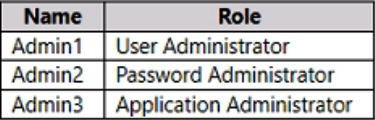
When you look at that site and the available roles, you WILL NOT see the Application Administrator listed. You do see all three when you look at Entra roles. So it must be C.
The answer is C.
https://learn.microsoft.com/en-us/entra/identity/role-based-access-control/permissions-reference
Microsoft 365 admin center doesn't have Application Administrator role
The correct tool to compare the role permissions of each user is the Microsoft Entra admin center.
The Microsoft Entra admin center (formerly Azure AD portal) is the dedicated portal for managing user identities, role assignments, and access control within Microsoft Entra ID. It allows administrators to view and manage directory roles assigned to each user efficiently.
While the Microsoft 365 admin center also allows for some basic user and license management, it is limited in detailed, granular role comparison across Azure AD roles.
o compare the roles:
Navigate to the Microsoft Entra admin center.
Go to Identity > Users > All users.
Select a specific user, then view their Assigned roles to see all roles at various scopes.
Repeat the process for other users to compare their permissions.
The correct answer is: C. the Microsoft Entra admin center
Here's why:
To compare role permissions of users in an Azure AD tenant, you need to view and manage directory roles assigned to each user. The Microsoft Entra admin center (formerly Azure AD portal) is specifically designed for managing:
User identities
Role assignments
Access control
Conditional access policies
Why not the others?
A. Microsoft 365 Defender portal: Focuses on security operations, threat protection, and incident response—not role management.
B. Microsoft 365 admin center: Useful for basic user and license management, but limited in detailed role comparison across Azure AD.
D. Microsoft Purview compliance portal: Used for compliance, data governance, and auditing—not for managing or comparing user roles.
To compare the role permissions of each user in your Azure AD tenant with minimal administrative effort, you should use the Microsoft Entra admin center (Option C).
The Microsoft Entra admin center is specifically designed to manage and monitor your Microsoft Entra ID (formerly known as Azure Active Directory). It allows you to view and manage user roles and permissions efficiently.
Option B: the Microsoft 365 admin center is primarily used for managing Microsoft 365 services, such as users, groups, licenses, and basic security settings. However, it does not provide detailed insights into Azure AD role permissions or allow for a direct comparison of role permissions assigned to users.
To specifically compare and manage Azure AD roles and permissions, Microsoft Entra admin center (Option C) is the correct tool, as it focuses on identity and access management within Azure AD.
Therefore, while Option B allows for some user and role management, it does not meet the requirement to compare detailed role permissions in Azure AD. Option C is more suitable for this task.
The correct answer is B. the Microsoft 365 admin center.
The Microsoft 365 admin center provides a centralized location where you can view and manage the role permissions of each user in your Azure AD tenant. This will allow you to easily compare the permissions of Admin1, Admin2, and Admin3, thus minimizing administrative effort. The other options do not provide this specific functionality.
If you dont include the answer choices:
You should use the Azure Active Directory (Azure AD) Privileged Identity Management (PIM). Azure AD PIM provides a consolidated view of the role assignments across your organization, and it makes it easy to see who has what permissions.
If you include the answer options given:
B. the Microsoft 365 admin center.
The Microsoft 365 admin center provides a consolidated view of the role assignments across your organization, and it makes it easy to see who has what permissions. This solution minimizes administrative effort as it provides a centralized view and management of role assignments.
Please note that the other options:
A. the Microsoft 365 Defender portal is primarily used for managing security threats.
C. the Microsoft Entra admin center does not exist.
D. the Microsoft Purview compliance portal is used for data governance and compliance, not for managing user roles and permissions.
https://learn.microsoft.com/en-us/microsoft-365/admin/add-users/assign-admin-roles?view=o365-worldwide#compare-roles
You can now compare permissions for up to 3 roles at a time so you can find the least permissive role to assign.
In the admin center
So it is B because it actually has a “compare roles” button to compare up to 3 roles with. So the question is not about actually comparing roles, but where the menu option is to do it the MS way. More certification trivia!
All 3 accounts are listed with role permissions in both portals. Since Entra is the place for ID management, the MS answer would be C. Also, the m365 portal lists the name of each permission not the actual syntax for each user right. Again, this supports the MS answer.
This section is not available anymore. Please use the main Exam Page.SC-300 Exam Questions
Log in to ExamTopics
Sign in:
Community vote distribution
A (35%)
C (25%)
B (20%)
Other
Most Voted
A voting comment increases the vote count for the chosen answer by one.
Upvoting a comment with a selected answer will also increase the vote count towards that answer by one.
So if you see a comment that you already agree with, you can upvote it instead of posting a new comment.



Julesy
Highly Voted 2 years, 1 month agoEr_01
1 year, 10 months agoAlscoran
1 year, 12 months agostrongline
1 year, 5 months agoGiuseppe_Geraci
6 months, 2 weeks agovladi72
Highly Voted 1 year, 4 months agoAlexBrazil
1 year ago16e52c8
Most Recent 1 hour, 41 minutes agoNeshiri
2 months, 1 week agoAcTiVeGrEnAdE
7 months agoPD1
10 months, 1 week agoOskarma
10 months, 2 weeks agoGrg433
10 months, 3 weeks agoNotanAdmin
1 year, 6 months agojtlucas99
1 year, 6 months agojsca
1 year, 6 months agoJuanZ
1 year, 7 months agoemartiy
1 year, 8 months agoEr_01
1 year, 9 months agobaz
1 year, 10 months agoJanioHSilva
1 year, 9 months agoEr_01
1 year, 10 months agocpaljchc4
1 year, 10 months ago